When a PNG Can Crash a WPF Application
Three unrelated UI commands failed on one Windows machine but nowhere else. The shared dependency was not geometry or business logic; it was WPF color conversion while decoding PNG images.
- WPF
- .NET
- BitmapImage
- ICC Profiles
- Windows
- Reliability

The stack trace moved the investigation away from feature code
The crash stack did not end in a CAD operation or an editor command. It ended while BitmapImage completed initialization. ColorConvertedBitmap appeared immediately below it, and the terminating exception was an arithmetic overflow.
The first PNG being decoded was present, readable, and byte-for-byte identical to the copy that loaded successfully elsewhere. It also carried an embedded iCCP color profile. That combination made a missing file, a damaged deployment, and the three feature implementations increasingly weak explanations.
text
Crash stack boundary
The useful boundary is the lowest application-independent frame that still explains all reported entry points.
System.OverflowException: The image data generated an overflow during processing.

   at System.Windows.Media.Imaging.ColorConvertedBitmap.FinalizeCreation()
   at System.Windows.Media.Imaging.BitmapImage.FinalizeCreation()
   at System.Windows.Media.Imaging.BitmapImage.EndInit()
   at ThumbnailLoader.Load(...)
   at FeatureWindow.Initialize(...)
A valid image can still fail in one Windows color environment
An image with an embedded ICC profile does not go directly from file bytes to final display colors. Windows color management can use the embedded source profile together with the active display or color-space profile to build a conversion. The same PNG can therefore exercise a different conversion path on two computers.
On the affected Windows 10 machine, an scRGB virtual device model profile was active in the effective device-profile configuration. Temporarily switching that profile to sRGB IEC61966-2.1 made all three reported workflows open normally. The same image already worked on a Windows 11 development machine, so a local non-reproduction did not invalidate the crash evidence.
Microsoft's WPF repository documents the same pattern: a PNG containing an iCCP chunk, a virtual display color profile, an OverflowException inside ColorConvertedBitmap, and successful loading when the profile is ignored or the display profile is changed. The issue is labeled as external to WPF, which is another reason to treat the operating environment as part of the investigation.
Use the environment change as a diagnostic, not the product fix
Changing the customer's display profile was a valuable controlled experiment because it changed one variable and made every known scenario work. It was not a suitable permanent product requirement. Users may have calibrated displays, vendor-provided profiles, remote-desktop configurations, or policies that the application should not rewrite.
The application owns the decision to decode an optional UI image. It should also own a safe degradation path when color conversion for that image fails. The operating-system change proved the boundary; the code change made the application resilient at that boundary.
- Record the original profile before any support-side experiment.
- Change only one profile-related variable and repeat every known scenario.
- Treat success as evidence for the diagnosis, not permission to require the workaround.
- Restore the user's configuration and move the recovery policy into the application.
Retry only the color conversion failure
The safe default is still normal color-managed decoding. Ignoring every embedded profile would avoid this particular conversion, but it would silently discard valid color information on healthy systems. A narrower policy attempts the normal load first and retries with IgnoreColorProfile only when WPF reports an arithmetic conversion failure.
OverflowException derives from ArithmeticException, so one narrow catch covers the observed exception chain without hiding missing files, invalid URIs, unsupported formats, permissions, or ordinary corrupt-image errors. The fallback should also be logged because it is a recovered environmental incompatibility, not an invisible success path.
csharp
SafeBitmapLoader.cs
This is a neutral teaching example. A fresh stream is opened for each attempt so the retry never inherits consumed stream state.
public static BitmapImage Load(Func<Stream> openSource)
{
    try
    {
        return Decode(openSource, BitmapCreateOptions.None);
    }
    catch (ArithmeticException error)
    {
        LogColorProfileFallback(error);
        return Decode(openSource, BitmapCreateOptions.IgnoreColorProfile);
    }
}

private static BitmapImage Decode(
    Func<Stream> openSource,
    BitmapCreateOptions options)
{
    using Stream source = openSource();

    var image = new BitmapImage();
    image.BeginInit();
    image.CacheOption = BitmapCacheOption.OnLoad;
    image.CreateOptions = options;
    image.StreamSource = source;
    image.EndInit();
    image.Freeze();
    return image;
}
The retry needs a replayable source
A fallback is only reliable if the second attempt receives the same input from the beginning. A stream may already be advanced, disposed, non-seekable, or owned by another component when EndInit throws. Reusing it blindly can turn the recovery path into a different failure.
The loader boundary should normalize every input into something replayable. File paths can open a new FileStream. Byte arrays can create a new MemoryStream. Caller-owned streams can be copied once into an internal byte array. URI loading can create a fresh BitmapImage for each attempt while preserving decode dimensions and any other supported flags.

- File path: reopen the file for every attempt.
- Byte array: create a new read-only MemoryStream for every attempt.
- Caller stream: copy once, then retry from owned bytes.
- URI: construct a new BitmapImage and reapply the requested options.
- Always use OnLoad when the source stream must be closed before returning.
Centralizing C# is not enough when XAML decodes directly
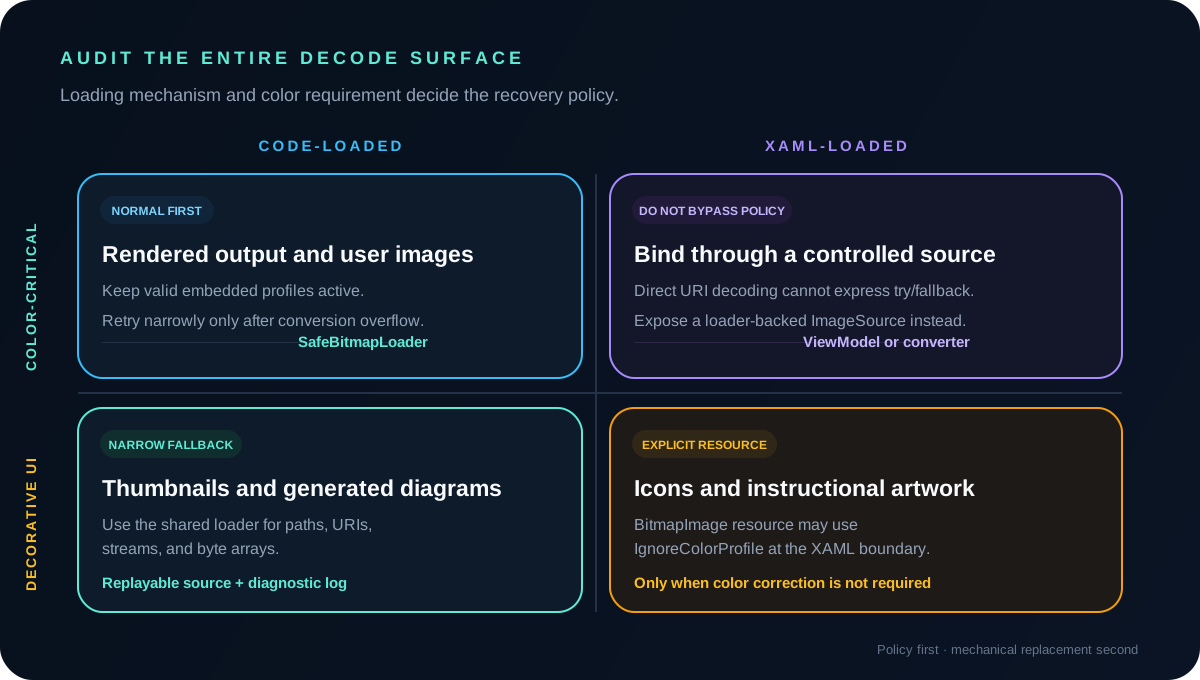
A repository-wide search found a second boundary. Some images were decoded through C# helpers, while others were loaded directly by XAML during InitializeComponent. A safe C# loader cannot protect a BitmapImage that XAML creates before the window constructor reaches application code.
For decorative, non-color-critical UI diagrams, an explicit BitmapImage resource can opt out of embedded profile conversion at the declarative boundary. Color-sensitive material previews, rendered output, and user content should continue through the normal-first loader so valid profiles remain effective whenever possible.
xml
ImageResources.xaml
Use this declarative policy only for assets where profile-based color correction is not part of the product requirement.
<Window.Resources>
    <BitmapImage
        x:Key="SafeDiagram"
        UriSource="/Assets/layout-diagram.png"
        CreateOptions="IgnoreColorProfile" />
</Window.Resources>

<Image Source="{StaticResource SafeDiagram}" />
Audit the decode surface, not only the original crash line
Fixing the first thumbnail would have made one command work while leaving the same environmental failure available through icons, reports, downloaded images, Base64 payloads, and editor previews. The durable change was an inventory of every place where raster bytes become a WPF BitmapSource.
That audit also needs policy, not just mechanical replacement. Code-loaded images can use normal-first fallback. Direct XAML assets need an explicit resource decision. Images whose color correctness matters should never be placed in an always-ignore bucket simply because that is convenient.
Test the policy even when the operating-system crash is not portable
An environment-specific graphics or color-management failure may not reproduce on a modern development workstation. That does not prevent deterministic testing of the application's response. The public teaching demo injects a first decode attempt that throws ArithmeticException and verifies that the second attempt adds IgnoreColorProfile, uses a fresh source, and succeeds.
The demo also verifies the negative contract: file, format, and unrelated decode errors are not converted into false success. A separate Windows-only sample documents how to try the real BitmapImage path, while making clear that the result depends on the active Windows and display-profile configuration.
This distinction keeps the test honest. It proves the recovery policy under application control without pretending that a machine-specific Windows conversion defect is reproducible everywhere.
The broader lesson is to make environmental assumptions explicit
The original symptom appeared behind feature buttons, but the failure belonged to a framework and operating-system boundary. The investigation succeeded because it followed the lowest shared stack frame, compared environments, and changed one external variable under controlled conditions.
The implementation then converted an implicit assumption—every embedded color profile can be converted on every customer machine—into an explicit policy: preserve color management by default, recover narrowly for a known conversion failure, log the degradation, and keep unrelated errors visible.
That pattern applies beyond images. When production software depends on codecs, fonts, regional settings, drivers, certificates, or hardware profiles, reliability improves when those environmental assumptions have observable and testable fallback boundaries.
Share